
Install and First Connection
1. Install the app
- Go to download page: Download MemoFlow
- Choose your preferred distribution channel on the download page (Google Play, Lanzou Cloud, or GitHub)
- Current releases focus on Android; iOS is still in planning
2. Prepare connection info
Before opening the login page, prepare these three items:
- Memos server address (for example
https://your-memos.example.com). - Login credential (choose one):
- Username + password
- Personal Access Token (PAT)
- Server version (login page supports selecting
0.21.0to0.26.0).
3. Fill the login page
There are four key fields:
- Login mode: switch between
PasswordandToken. - Server URL: enter root URL only. Do not manually append
/api/.... - API version: select the server version from dropdown.
- Click Connect.
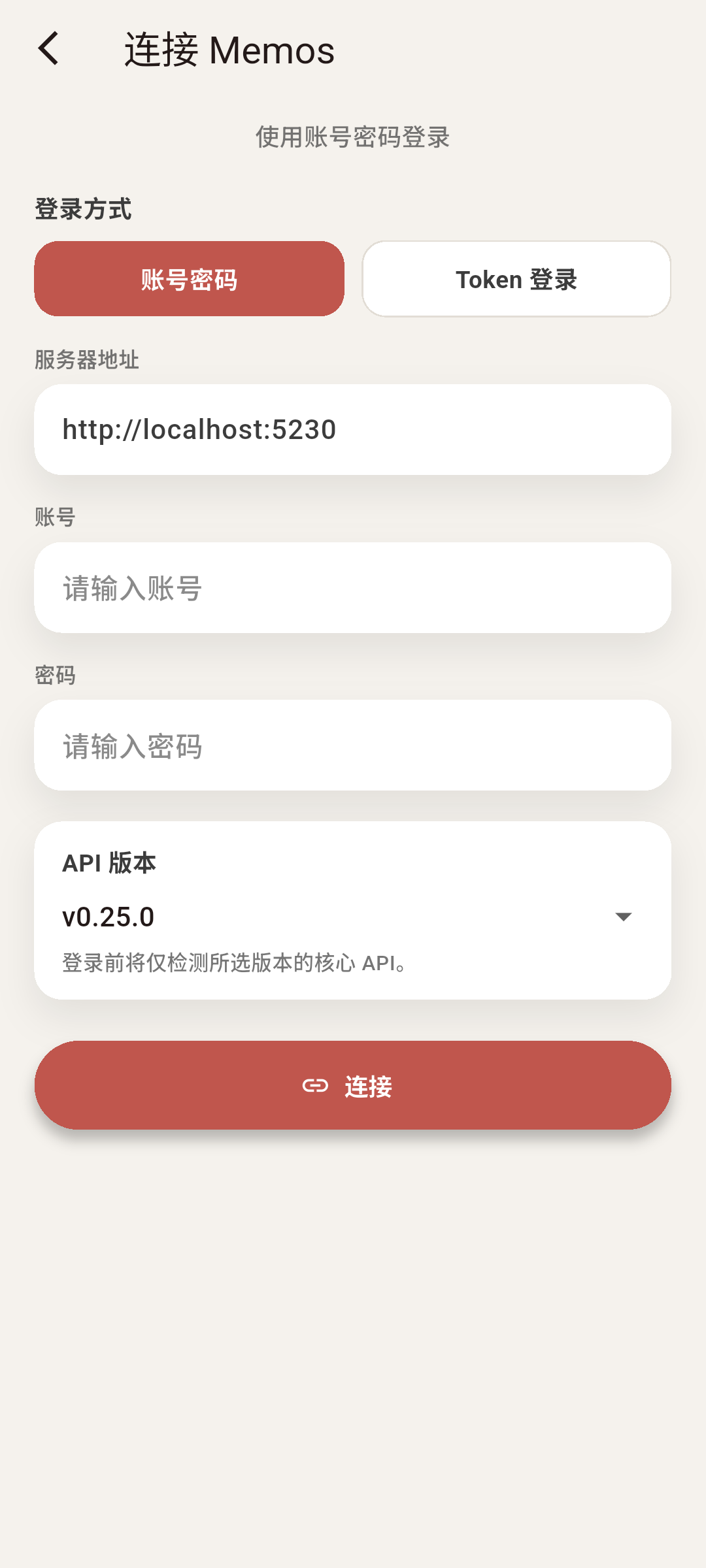
4. Connection validation behavior (as implemented)
- Token login: runs API-version probe on selected version first, then enters session.
- Password login: signs in first, then runs selected-version probe.
If probe fails, the page shows a diagnostics panel (copyable), useful for identifying version mismatch vs server endpoint issues.
5. First-connection verification
After login, run this quick 60-second verification:
- Open memo list and wait for first data load.
- Create one test memo (for example: "connection test").
- Pull to refresh once and confirm it is still visible.
- Confirm the same memo exists on the server side.
6. Two useful details
- If URL is entered with
/api/v1, the app normalizes it back to root URL and prompts. - In token mode, pasting values with
Bearerprefix is supported; prefix and extra spaces are auto-cleaned.